Tank & Vessel Drafter AIAPI 510 · API 653 DRAWING SETSPowered by Appalachian Integrity
The vessel drawing set, spoken instead of drafted.
Say it the way you’d tell a helper: height, diameter, heads, courses and nozzles. Check the entries, then build the General Arrangement and shell roll-out. Add a CML (condition monitoring location) grid, nozzle schedule and design data. Built for API 510 and API 653 inspectors.
Customer testing is open. The subscription is $19.99/month. PDF or print uses 1 credit per sheet. Editable CAD/DXF uses 5 credits per file. Drafting and editing use no credits.
AI assistance powered by OpenAI. Your selected text and supporting context go to OpenAI when you request AI help; review each suggestion before use.
Already have a Weldbook account? Use the same sign-in. Open the tool from your toolbox after choosing its trial or subscription.
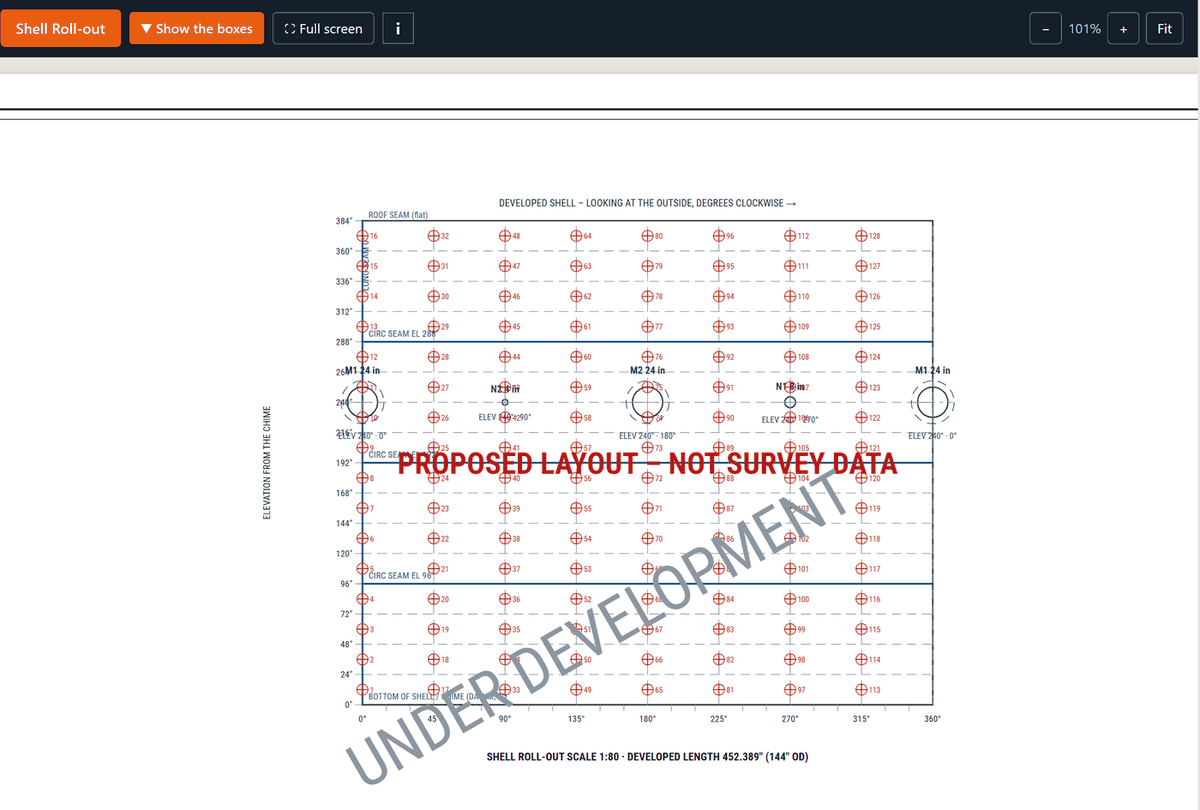
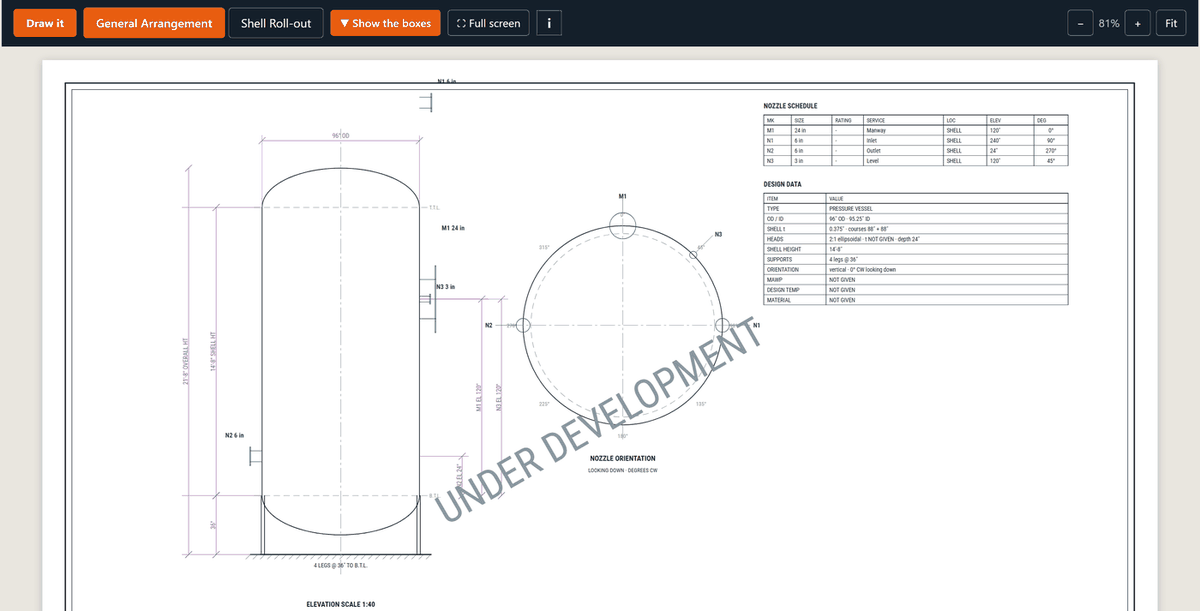
Tank & Vessel Drafter AI, in testing — the shell roll-out with the CML grid.Tank & Vessel Drafter AI, in testing — the General Arrangement sheet.
What it looks like
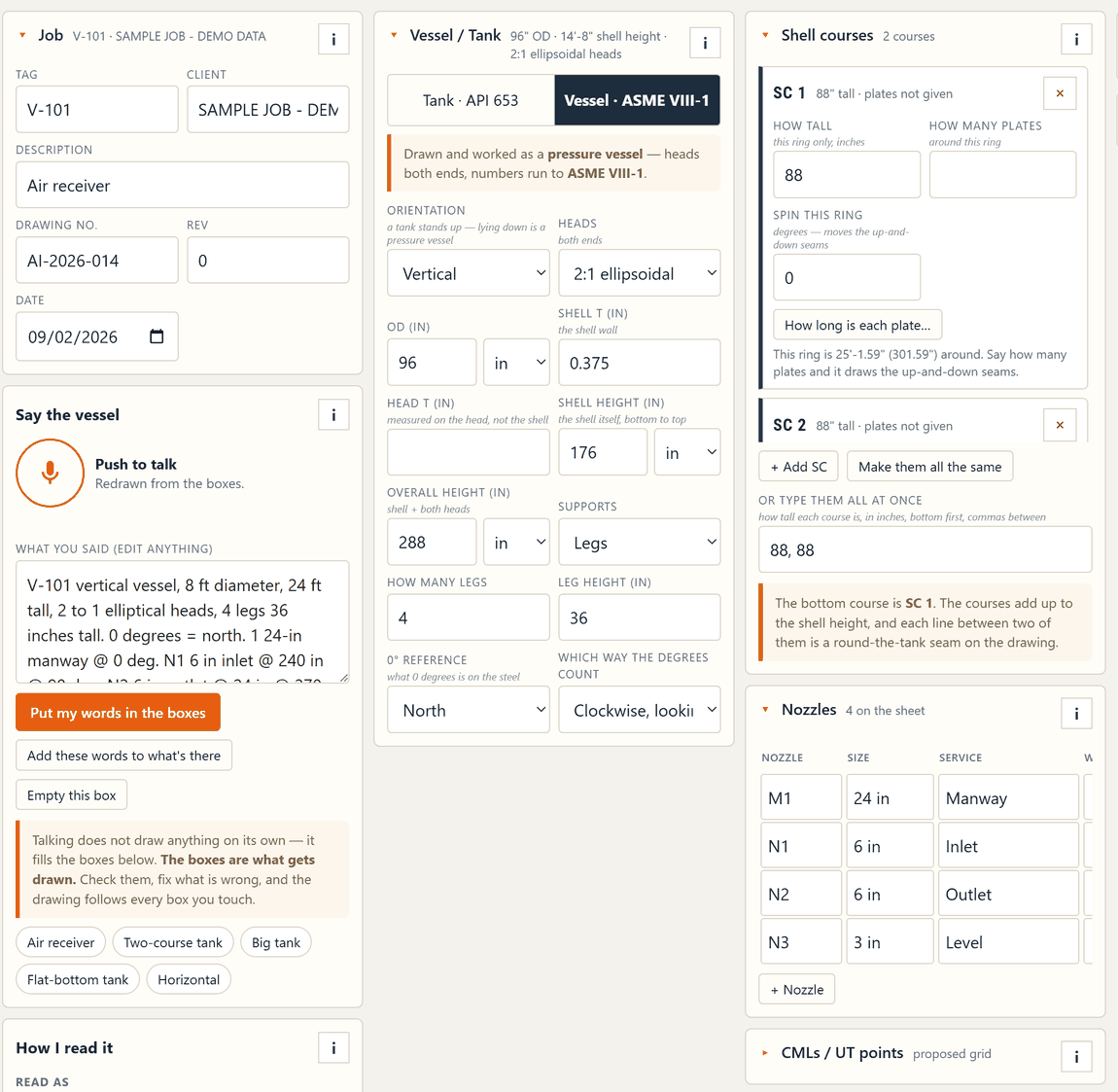
Tank & Vessel Drafter AI, in testing — the boxes that get drawn.
The problem
The inspection took a day. The drawing set takes the week.
You’ve got the nameplate, the U-1A, a tape and a gauge. The report needs a General Arrangement with the nozzles in place. It also needs a shell roll-out, CML points and design data. You measured it in the field. Now the drawing work is waiting at the desk.
Build the drawing set from your field notes and measurements. The customer preview is open for testing.
How it works
Build and check a drawing set in the customer preview.
Step 1
Say it.
Push to talk. Give the height, diameter, heads, supports and each nozzle. For example: “N1 at 40 inches, at 90 degrees.” Your words fill the boxes. Check and correct those boxes before drawing.
Step 2
Check the assumptions.
ASSUMED and STILL NEED stay on screen. No roof mentioned means an open top, said out loud. A head thickness nobody measured prints t NOT GIVEN. Two nozzles in one hole turn red.
Step 3
Draw it.
General Arrangement: Elevation, nozzle positions, nozzle schedule and design data.
Shell roll-out: The shell laid flat, with seams, nozzles and CML points.
Readings: Enter them one point at a time. They print beside each point.
Step 4
Check the sheets and numbers.
Add the drawing set to a report. Finished files use credits. The Calcs tab gives preliminary inspection results. Check all inputs. The engineer of record provides the governing calculation.
Check every dimension, nozzle and note before using a drawing in an inspection record.
What's in it
The whole set.
General Arrangement and Shell Roll-out on 17 × 11, with nozzle schedule, design data and notes. The title strip carries client, drawing number, rev, equipment and date.
Vessels and tanks, each drawn as what it is.
Vertical or horizontal pressure vessels — stations from the datum end, 0° at the top of the shell. API 653 storage tanks as their own kind: chime datum, open top or cone or dome, shell courses as rings of plates with the seams where the plates are.
Nozzles by mark, elevation and degrees.
Pick your 0° reference — nameplate, plant north, any nozzle — and which way the degrees count. A nozzle count is a checklist, never an invitation to invent.
A readings screen for the ladder.
One CML point on screen at a time, big enough for gloves. Type three digits and it moves to the next one. Skip means blank, never zero.
First-pass numbers, labelled.
Review minimum required thickness (t-min), maximum allowable working pressure (MAWP), corrosion rate, remaining life and inspection dates. Tank mode uses API 653. Vessel mode uses ASME VIII-1.
Choose joint efficiency from the list and check the cited code table. Enter allowable stress from your own code book for the material, edition and temperature.
Preliminary — for inspection reference. Check every input and result. The engineer of record provides the governing calculation.
Real files.
Save a separate editable job backup named vessel.json. Add drawings to your report when ready. Finished drawing files use credits. Watermarked previews are for review.
Plain talk, all the way down.
Tap the square “i” for help in each section. Read every warning and check missing or assumed details.
Phone, tablet or computer
Use the same Weldbook sign-in on your phone, tablet or computer. Each app has its own access plan.
Drawing jobs: Saved in the browser on the device you use. Save the editable job file as a separate backup.
Reports: Drawings you add to a report, saved report drafts and report photos are stored in your account on our server.
Who it's for
Built for API 510 pressure-vessel inspectors and API 653 tank inspectors. Draw the General Arrangement, shell roll-out, nozzle schedule and CML grid from your field measurements.
Pricing
Pricing
The subscription is $19.99/month.
PDF or print: 1 credit per sheet. A 2-sheet PDF uses 2 credits.
Editable CAD/DXF: 5 credits per file.
Company name or logo: included.
Download or print the same paid version again: no extra charge.
The first tool in the box is out now. Weldbook AI — 7-day free trial, no credit card, Independent Inspector $9.99/mo.
FAQ
Does it make inspection calls?
No. The app draws your entries and flags assumptions. You check the drawing. Its calculations are preliminary inspection results that need qualified review. The engineer of record provides the governing calculation.
Is it real CAD, or a picture of CAD?
It builds drawing geometry for a General Arrangement and shell roll-out. PDF or print uses 1 credit per sheet. Editable CAD/DXF uses 5 credits per file. Saved images come with the paid files. Clean files are available through this website, not native apps.
Does it handle tanks, or just vessels?
Both, and it knows the difference. A storage tank draws from the chime, with courses as rings of plates and an open top when you didn't say roof. A pressure vessel draws from the tangent line, vertical or horizontal. Tank calcs follow API 653; vessel calcs follow ASME VIII-1.
Why does it cost more than the weld log?
The drafter builds the vessel, roll-out and nozzle schedule from your entries. Drawing reports have their own export prices. If the log is all you need, Weldbook AI is still $9.99/mo on its own.
Where do the code numbers come from?
Read the applicable values from your own code book. For S, enter the allowable stress for the actual material, code edition and temperature used in the calculation. Verify joint efficiency and every other input against the applicable code. Preliminary results require qualified review.
Does it replace the engineer?
No. It helps prepare drawings and preliminary inspection calculations. You must check the work. The engineer of record provides the governing calculation.
Can I use it today?
Yes. Open the customer preview from your toolbox. Review the entries and drawings on a real set of field notes, and send us anything that needs fixing. Watermarked previews are for review. Finished drawing downloads require credits.
Where will it live, and what does it cost?
Use your existing Weldbook account. The subscription is $19.99/month. PDF or print uses 1 credit per sheet. Editable CAD/DXF uses 5 credits per file. Issuing a version locks it. A later revision uses credits when issued. Download the same paid version again at no extra charge.
Try it on your next set of field notes.
Create an account or open your toolbox. Drafts and previews use no credits. Each drafter needs its own trial or subscription. Buy credits through this website when you need clean files.
Tank & Vessel Drafter AI · a Weldbook AI family app · powered by Appalachian Integrity. Appalachian Integrity LLC, Catawba, Virginia. For API 510 and API 653 inspectors.