Build the report from your notes, photos and readings. Add sheets from Tank & Vessel Drafter AI or Weld Map ISO Drafter AI. Write your findings and recommendations, review the pages, then save the finished PDF.
Customer preview is open. No API Report Builder subscription is needed. A clean report uses 1 credit per report page, plus the credits for attached drawings.
AI assistance powered by OpenAI. Your selected text and supporting context go to OpenAI when you request AI help; review each suggestion before use.

The inspection is done. Now match each photo to the right nozzle, type the findings, add the readings and lay out the pages. Notes made at the equipment are easier to follow than memories from last week.
Write the photo caption at the equipment. Build the report from those notes while the details are still clear.
Use the drawings you already made. Add the shell roll-out from Tank & Vessel Drafter AI or the pipe sketch from Weld Map ISO Drafter AI. Keep the drawing sheets with the findings and readings in one report.
Choose Add to report in either drafter. This saves the drawing set to your account and opens Report Builder. Review each sheet and the total credits before you confirm.
Start the job and choose the asset tag. Take the photo, name the part and write what you found. Add findings such as pitting, coating loss or suspected corrosion under insulation (CUI). Keep the job package on your phone until you send it.
One package per job, photos and captions together.
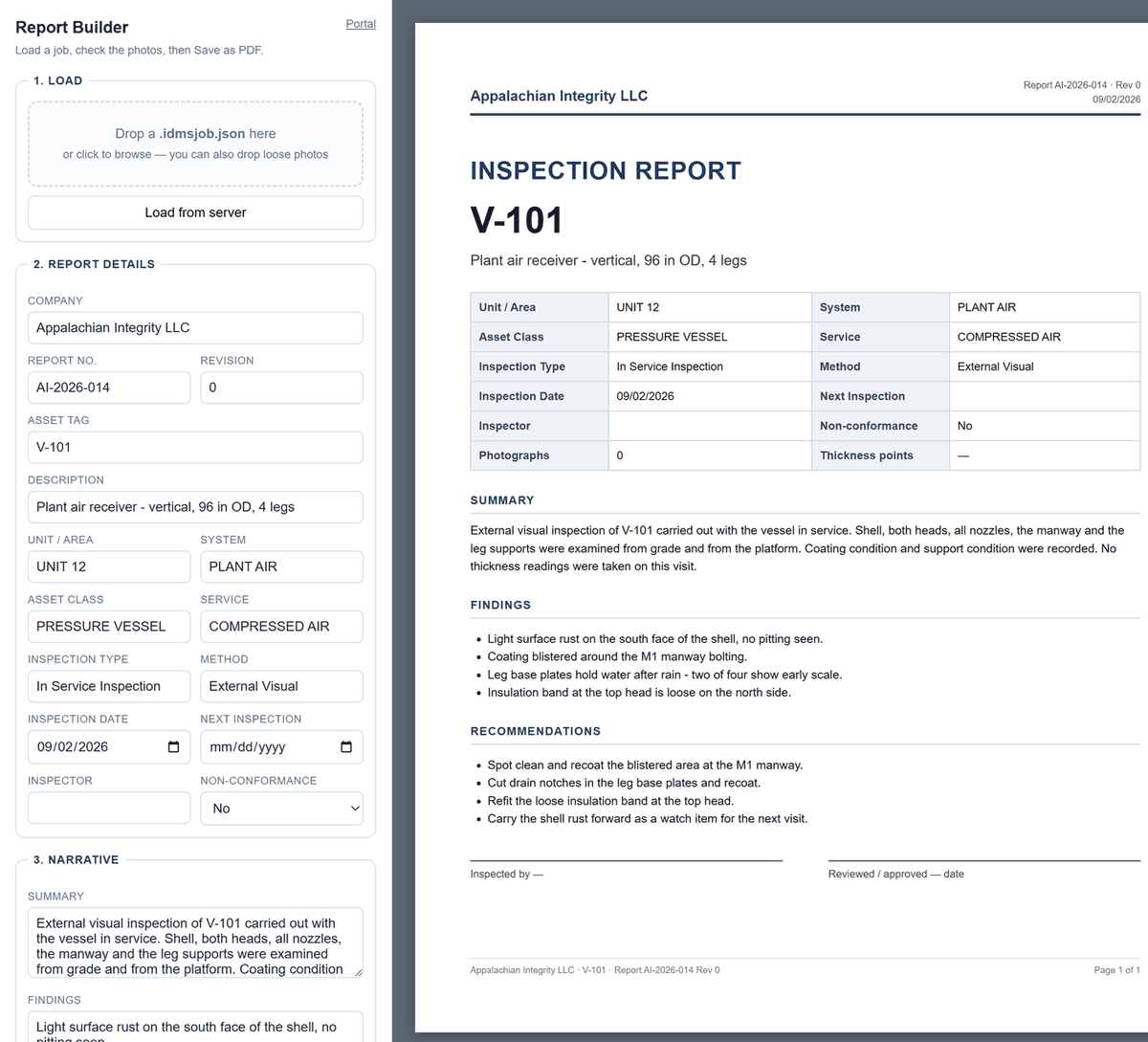
Review letter-size pages with page numbers, readings, captioned photos and signature lines. Enter the minimum required thickness (t-min) from the governing calculation. Check how the readings compare before saving the PDF.
The report reads the way the job went, because it was written while the job went.
Load a saved job package, add photos, or open a job saved to your account. Build from those records instead of a blank page.
Load the UT data sheet and review the imported readings. The 8-point ring uses 0° at the top, with angles counted clockwise. Check any suggested angle changes, blank readings or duplicate points. Check the final rows before adding them to the report.
Pick the asset tag and the description, unit and class come with it, off the list you already keep.
Choose the job and asset. Take each photo, add a comment and name the part or location. Save a job package on your phone or send it to the computer.
Keep the company, report number, revision and equipment details together. Add the inspection type, dates, inspector and any non-conformance. Check details filled from your asset list.
Write a short summary. Put each finding and recommendation on its own line. They print as lists.
Add the location, angle, thickness reading and t-min from the governing calculation. Review the comparison and any missing values. The table does not decide whether equipment is fit for service.
Photos print 2 to a page with the part name and findings. Reorder or hide photos as needed. Check warnings for missing comments before you issue the report.
Header, footer, Page n of N, and the signature lines at the bottom.
API 510, API 570 and API 653 inspectors writing fixed-equipment inspection reports — external and internal visual, UT thickness, CUI, on-stream — and the QC managers who have to read them in one format.
Add sections, checklists, photos and drawings. Save a report style to use again. A clean report uses 1 credit per report page, plus the credits for attached drawings.
The first tool in the box is out now. Weldbook AI — 7-day free trial, no credit card, Independent Inspector $9.99/mo.
The customer preview is open. Create an account or use your Weldbook sign-in. Build, save and reopen reports. Check the total credits before you confirm a clean file.
No API Report Builder subscription is needed. Drafting uses no credits. A clean report uses 1 credit per report page, plus the credits for attached drawings. New clean drawings also need access to the matching drafter. Buy credit packs through this website.
Yes. Choose Add to report in Weld Map ISO Drafter AI or Tank & Vessel Drafter AI. The sheets are saved to your account and opened in API Report Builder. You can also attach your own drawing images.
Yes. Enter notes, checklists and photos, change the section order, and review the report on phone, tablet or computer.
You write the summary, findings and recommendations. The app lays out your words, photos and readings. Check the report and total credits before you confirm the finished file.
No. Enter minimum required thickness (t-min) from the governing calculation. The table compares your readings with that value and flags missing values. It does not accept equipment or decide fitness for service.
No. Findings are yours — typed by you, tagged by you at the asset. It's a report hand, not an inspector.
Create an account or open your toolbox. Drafts and previews use no credits. Each drafter needs its own trial or subscription. Buy credits through this website when you need clean files.
Create an accountOpen my toolboxAPI Report Builder · a Weldbook AI family app · powered by Appalachian Integrity. Appalachian Integrity LLC, Catawba, Virginia.