OUT NOW
Weld Map ISO Drafter AI - horizontal lockup on dark - a Weldbook AI family app, powered by Appalachian Integrity AI WELD MAP ISO DRAFTER AI API 570 WELD-MAP ISOS · CWI WELD MAPPING POWERED BY APPALACHIAN INTEGRITY
Weld Map ISO Drafter AIAPI 570 WELD-MAP ISOS · CWI WELD MAPPINGPowered by Appalachian Integrity

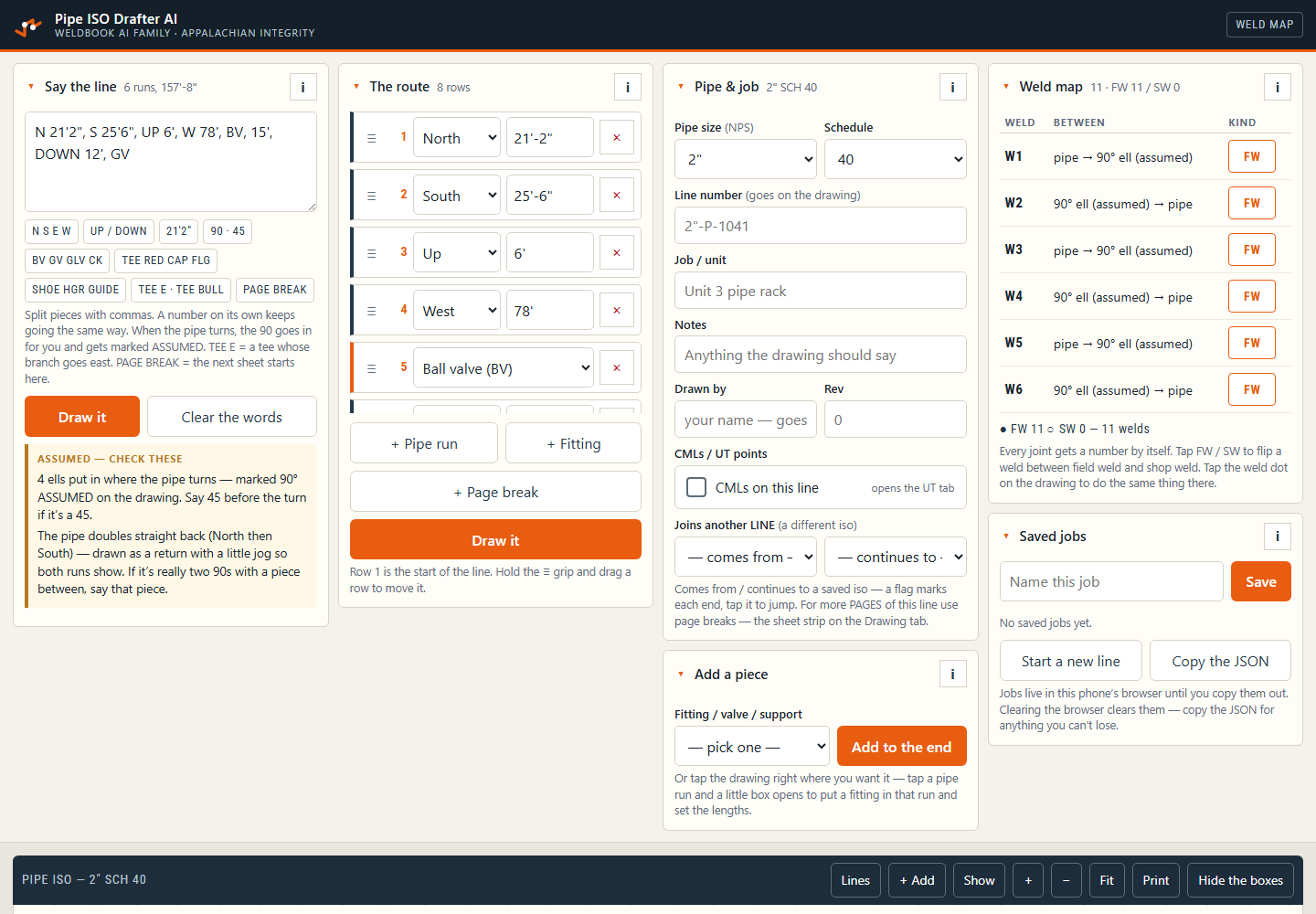
Say the run out loud. Walk away with the iso.

Say the run the way you’d tell a drafter: direction, length, fitting. Type it or use your phone keyboard’s mic. The app draws the iso and numbers each field or shop weld. Built for API 570 inspectors and CWI weld mapping.

Create your ISO in the field, then finish your review in Bluebeam. Export a PDF and open it in Bluebeam Revu to add notes, revision clouds and stamps.

Out now. The subscription is $14.99/month.

AI assistance powered by OpenAI. Your selected text and supporting context go to OpenAI when you request AI help; review each suggestion before use.

Already have a Weldbook account? Use the same sign-in. Open the tool from your toolbox after choosing its trial or subscription.

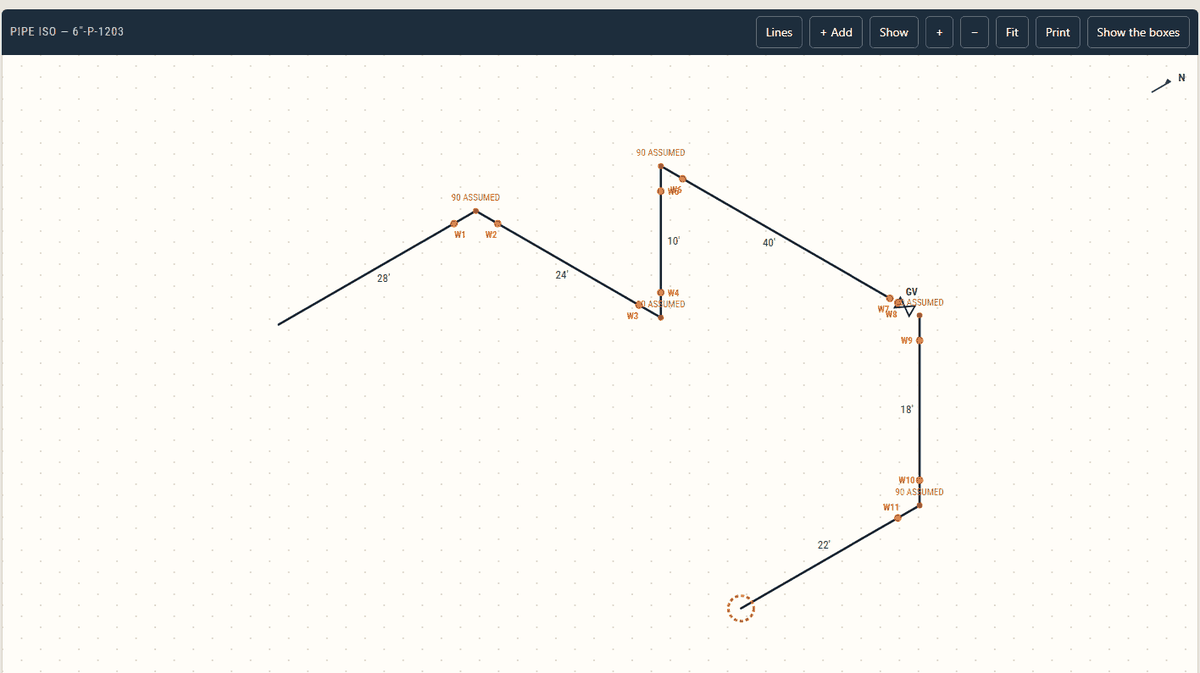
A finished pipe isometric on dot paper in Weld Map ISO Drafter AI, every joint numbered as a weld with run lengths and a north arrow
Weld Map ISO Drafter AI — a finished iso with the weld map on it.
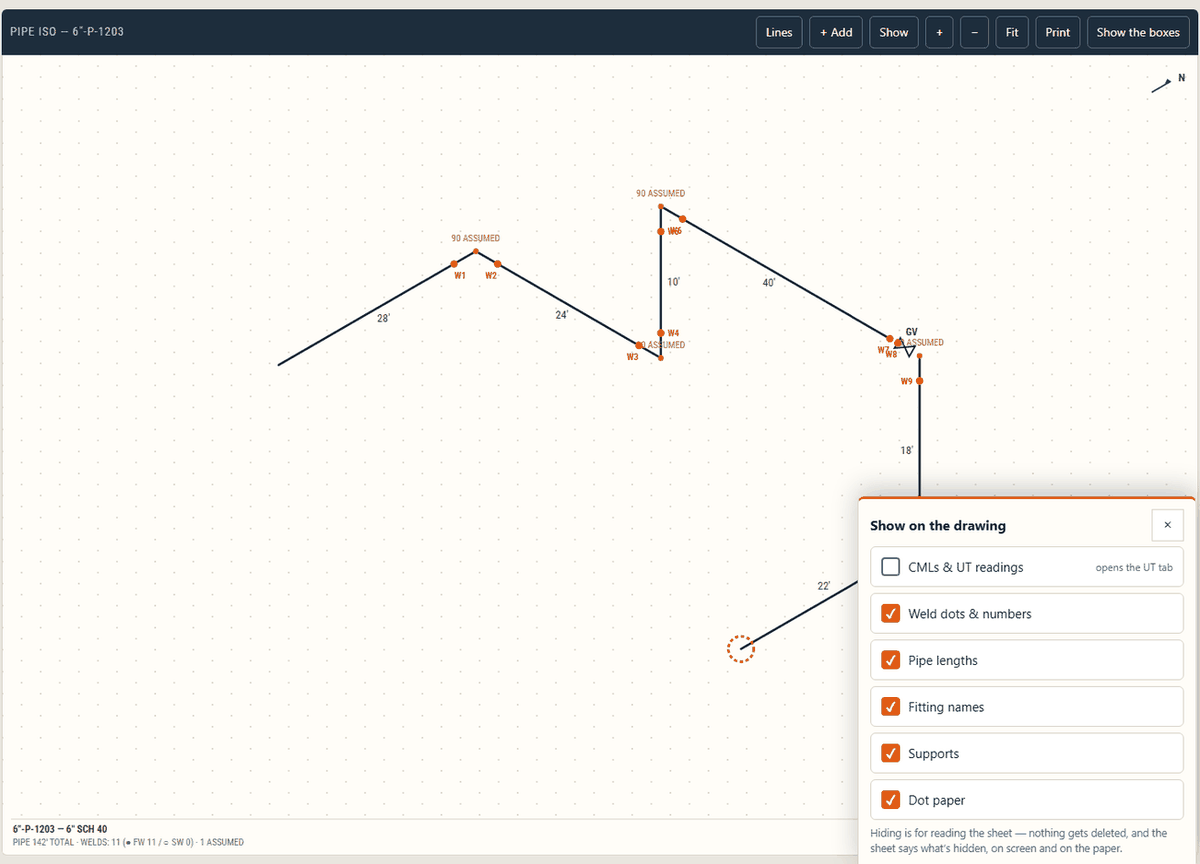
The same isometric with the app's own "Show on the drawing" panel open
Weld Map ISO Drafter AI — choosing what shows on the sheet.

What it looks like

Weld Map ISO Drafter AI open on a computer: a line said out loud, drawn, with every joint numbered as a weld
Weld Map ISO Drafter AI, open on a computer — one line said out loud, drawn as 6 runs with 11 joints numbered as welds.
The problem

The weld map is what they’re paying for. The sketch is the chore.

You walk the line. Count the joints, mark field or shop, note the lengths and take readings at each CML (condition monitoring location). Then the sketch sits in the truck until report day. The pipe hasn’t moved. The paperwork has.

Weld Map ISO Drafter AI draws the iso while the run is in front of you, and the weld map is on it from the first joint.

How it works

Step 1

Say the line.

Type it or dictate it: direction, length, fitting. N 21'2", S 25'6", UP 6', W 78', BV. Split the pieces with commas. A bare number keeps going the same way and reads as feet — and the sheet says so.

Step 2

It draws. Every joint is a weld.

The iso has dot paper and a north arrow. Each joint gets a weld number in route order. Tap FW/SW to switch between field and shop welds. If a turn has no fitting listed, the app adds a 90° elbow and marks it ASSUMED. Check it.

Step 3

Fix it by row, not by redrawing.

The route is a list of rows. Change a length, add a fitting or move a row. Add a CML where you took readings. Then tap Draw it.

Step 4

Print it. Keep it.

Print letter-size or 11 × 17-inch sheets. Save the editable job file (JSON) as a separate backup. Every sheet says: FOR WELD &/OR CML MAPPING — NOT FOR CONSTRUCTION.

What's in it

The weld map.

Every joint auto-numbered W1 to Wn in route order. Field weld solid, shop weld open — one tap flips it, on the list or on the drawing. The title strip counts them: FW, SW, total.

The fittings you actually call.
  • 90° and 45° elbows.
  • Ball, gate, globe, check, butterfly and relief valves.
  • Tees, reducers, caps, flanges, blinds and weldolets.
  • Shoes, hangers, guides, anchors, trunnions and supports. These do not add a weld number or split a joint.
CML/UT points on the same sketch.

Tap a run or fitting to add a thickness point. Take 4 readings: 0° at the top, then 90°, 180° and 270°. The lowest reading prints beside the tag. Import the gauge’s spreadsheet file (CSV), or paste the readings.

Assumptions out loud, never silent.

Check the ASSUMED elbows and any “length?” flags. If you say only “valve,” the app puts it in STILL NEED so you can choose the type.

Long lines, many sheets.

Long runs split across sheets. Match marks show where they join. A connector at the end opens the next iso and saves the current one first.

Show or hide layers.

CMLs, welds, lengths, fitting names, supports, dot paper. Whatever you hide, the sheet says so: NOT SHOWN ON THIS SHEET.

Clear limits on every sheet.

Straight runs are proportional; fitting symbols are not to scale. Every sheet carries the line number, size and schedule, total footage, date, and FOR WELD &/OR CML MAPPING — NOT FOR CONSTRUCTION.

Phone, tablet or computer

Use the same Weldbook sign-in on your phone, tablet or computer. Each app has its own access plan.

Drawing jobs: Saved in the browser on the device you use. Save the editable job file as a separate backup.

Reports: Drawings you add to a report, saved report drafts and report photos are stored in your account on our server.

Who it's for

Built for API 570 piping inspectors and CWIs doing weld mapping on pipe — the field-weld/shop-weld map and the CML survey sketch that go in the report. If you sketch runs for a living and hate redrawing them, it's for you too.

Pricing

Pricing

$14.99 a month includes watermarked field sheets. Clean sheets use 0.5 credit each, from your account balance.

Need a weld log too?

FAQ

Does it make inspection calls?

No. It's a drafting hand, not an inspector. It doesn't accept anything, reject anything, or make one call on your behalf. You describe the run, it draws the iso with the weld map, and you review it the way you'd review anything out of a drafting department.

What happens when it draws the run wrong?

Check the route against the pipe while you’re still at the job. Fix wrong lengths, fittings or directions in the rows and draw it again. Check each item marked ASSUMED before you use the sheet.

Is it to scale?

Straight pipe runs are drawn in proportion to their entered lengths, using one common scale within each sheet. Each sheet fits its available space, and fittings remain readable symbols. It is not a calibrated construction drawing: use the written dimensions, not a ruler or Bluebeam measurement tool, for actual pipe lengths.

Can I use the ISO in Bluebeam?

Yes. Export the ISO as a PDF, open it in Bluebeam Revu, and add your review notes, clouds and stamps. Existing weld tags and CML labels are part of the drawing; they are not separate editable Bluebeam markups. Changes made in Bluebeam do not update the job in this app.

Can I get a DXF?

Clean files from this website include PDF, picture (PNG) and editable CAD (DXF) formats. Each sheet uses 0.5 credit. Watermarked field sheets are included with active access. Keep a separate editable job backup (JSON). Clean files are not available from native apps.

Do I have to talk to it?

No. Type the route, use your phone keyboard’s mic, or build it row by row. Check the rows before drawing. The rows control what gets drawn.

Why does it cost more than the weld log?

The ISO subscription covers the drawing tools, weld mapping and watermarked field sheets. If the log is all you need, Weldbook AI is still $9.99/mo on its own.

Where does it live, and what does it cost?

Use your Weldbook account on phone, tablet or computer. The subscription is $14.99/month and includes watermarked sheets. Each clean sheet uses 0.5 credit. Small WELDBOOK AI branding stays at the side and footer. Buy credit packs through this website.
Try it on your next set of field notes.

Create an account or open your toolbox. Drafts and previews use no credits. Each drafter needs its own trial or subscription. Buy credits through this website when you need clean files.

Create an accountOpen my toolbox

Weld Map ISO Drafter AI · a Weldbook AI family app · powered by Appalachian Integrity. Appalachian Integrity LLC, Catawba, Virginia. For API 570 piping inspectors and CWI weld mapping.